PSVR2 - My First Impressions
An underrated headset for an unintentional use-case.

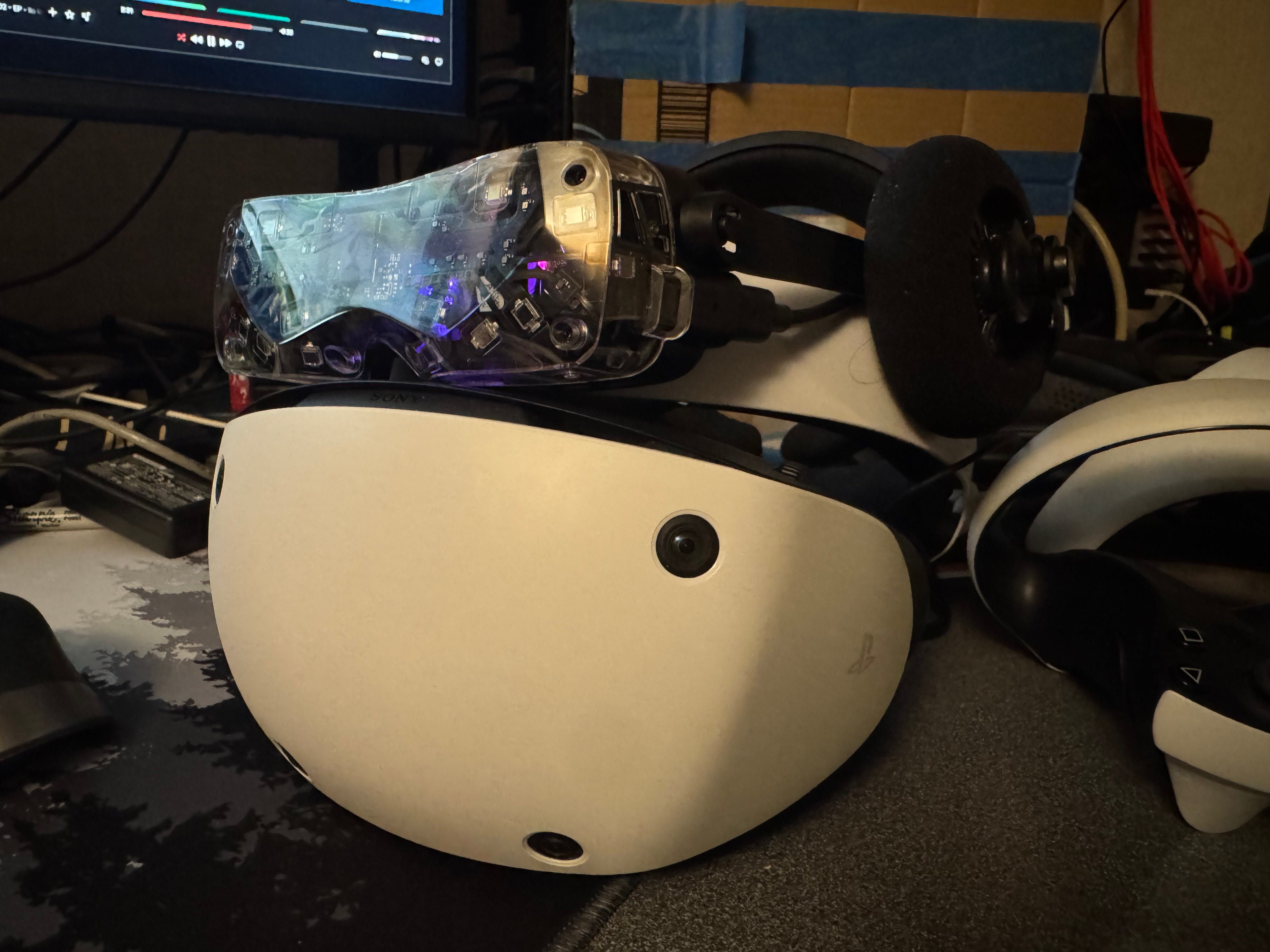
I’ve been using VR devices for quite a little while now. Perhaps not as much as VR veterans, but definitely long enough to form opinions. In fact, let’s take a trip all the way back, just for a moment. (We can dive a little deeper at a later time, but I’ll keep things brief for now.)
I think there is quite a lot to be said about various VR devices, and the PSVR2 is one I’d like to personally talk about today.
A Brief, Personal History
Just a Kid
Around 2012-2013, I ran across something in the news about a VR headset. This was the beginnings of the company Oculus, founded by Palmer Luckey, with the product being the Rift DK-1. The only thing I saw at the time was this massive looking screen mounted on someone’s face, and on the external monitor was video feed of the internals of a WWII monoprop fighter. (Might have been a Spitfire? Or a P-51 Mustang?) Obviously, I saw that and knew I wanted it. However, I wasn’t even a teenager at the time, and there was no way my parents would get me something like that, with the amount of restrictions of screen time I had back in the day.
Jump forward to the HTC Vive, where Valve and SteamVR were pushing for Roomscale VR. I knew I wanted that. However, I was still only a teenager at the time, not really earning money.
Baby Steps
Fast forward even further to around March, 2022. College kid, few semesters in already, and had a bit of money from an internship. I just tried my friend’s Quest 2, playing Beatsaber, and my first reaction after taking off the headset was: “F*ck you, now I want one!” So the next few days, I looked for deals and found an Oculus Rift S for $215 on Reddit r/HardwareSwap.
This headset was great at the time, at least for someone who knew nothing about VR. It helped me realize that, after a long day of studies and club work, when I just want to be alone and wind down in my room, maybe I can immerse myself in a virtual world, slicing pixelated blocks to the beat of a fast-paced electronic song or two. Perhaps my roommate shouting at his teammates in a game of League of Legends, and my neighbours edging for a noise complaint on the shared wall don’t need to be so loud, when I plug in my noise-cancelling headphones and don my vision-cancelling headset. Maybe, just maybe, there could be some relief from all the stress of college.
Ah! How things were simpler back then.
Getting Picky
In May 2023, after working full-time for a few months, I upgraded from the Rift S and got myself a Reverb G2 for about $200. This showed me how VR headsets could get even better than just the Rift S. I wanted more.
I preordered the Bigscreen Beyond, knowing full well I needed to wait. I already had SteamVR base stations for my Valve Index Controllers (nicknamed Knuckles) and Tundra Full Body trackers. However, I knew I wanted something lighter weight and, more importantly, something that was integrated natively in the Lighthouse environment, so I wouldn’t need to deal with space calibration. (At the time, space calibration software was widely fragmented and maintaining calibration with the Reverb G2 was questionable at best.)
I was then hired by Bigscreen (after formal application, interview, etc. process), in which I used my Beyond for the first time properly.
Now I’m a Snob
There, I said it. I admit fully, I am a VR/AR headset snob.
The Beyond 1 ruined my perception of all other headsets.
Why, when other headsets are twice, three, or four times the size, should we put up with the weight, discomfort, and fragmented software landscape of other headsets when something as small and unobtrusive as the Beyond offer much more?
That being said, the Beyond 1 has its downsides. With the Beyond 2’s announcement on March 20th, 2025, I can now talk a little more about the downsides of Beyond 1 as Beyond 2 aims to improve on these in every way possible. Simply put, the Beyond 1 optics, designed between 2021-2023, was not very good in terms of things being outside of the “sweet spot”, including when the eye moves anywhere outside of the center field of view. For some, it’s ignorable. For others, it was a deal breaker.
However, the headset was $1,000 USD, and a little more for international customers (due to VAT, taxes, duties, etc. being included in the final price). As a package, it’s definitely something worth considering… if you’ve already been in the PCVR ecosystem for a decent amount of time, that is.
But what about people like that college kid buying a used Rift S on r/HardwareSwap in 2022?
Enter PSVR2
I decided randomly to pick up a PSVR2 for myself. There was absolutely no need to do so at this point. I have more headsets than I know what to do with all of them. I even recently gave away two headsets just because I wasn’t using them. (My old Rift S to a top-level Beatsaber player and, more importantly, good friend… and my Pico Neo 2. Yes, in 2025. Don’t ask, I test cursed things every now and then.)
So why would I get myself a PSVR2?
Existing Problems from the High End
Well, simply put, it’s a modern headset (released in 2023) with PCVR support (through an adapter), can be found relatively affordably on eBay, and is an all-in-one PCVR package including controllers and — more importantly — not lighthouse tracked.
To cut a long story short, over the past year of using lighthouses, I’ve grown pretty sick of using these marker-based tracking systems simply because of how fussy they could get. Sure, they’re hyper-accurate… when they work. And when they don’t work, things just go flying off all over the place. This doesn’t just include occlusions, reflections, and all the usual base station stuff we’re used to — no, this also includes USB and RF interference, as these watchman dongles have pretty solidly done my head in for a while.
I’ve switched between my Pico 4 Enterprise (which also has an added benefit of eye and face tracking, along with being wireless) and Beyond for this reason — not needing to deal with SteamVR tracked controllers allowed me to type on virtual keyboards a lot easier and interact in Social VR a lot smoother. However, wireless VR comes with its own set of challenges too — it relies on WiFi communication between your PC, router, and headset all in the same space.
Convenience
The PSVR2? Controllers simply rely on Bluetooth. Headset remains wired. Tracking is done by its own integrated cameras.
Is it perfect? By no means, perfect — in fact, within the first few hours of me messing with it, I’ve noticed a couple times where things would go a little off axis, but it would pretty quickly correct itself. However, after initial setup, using the PSVR2 was pretty seamless and intuitive.
In fact, the more I used the PSVR2, the more I felt like this was simply like my old Rift S… but without its reliance on the Oculus desktop software, runtimes, etc., higher resolution, more vibrant colours, higher refresh rate…
I fired up a game of Beatsaber and got into the song $100 Dollar Bills — a song I know quite well from various informal testing procedures we made up for the Beyond 1. Expert mode, naturally.
Holy sh*t!
It’s literally just my Rift S all over again.
I was instantly brought back to when I was wearing my Sony XM4 headphones with noise cancellation, over my Rift S, and my glasses jankily pushing against the fresnel optics in front of that single screen. However, instead of being back in 2022 — instead of needing to mentally block out my roommate screaming at his teammates on League, instead of my next door neighbours reminding me of how long it’s been since my last date, instead of all that — I was simply one with my sabers, head, and the song.
The best bit about it? Everything felt more real. More vibrant, brighter, wider FOV, and just better. I caught myself smiling the entire way through that song, and I just had to keep playing more.
Imperfect Beauty
That being said, was I just chasing nostalgia? Or did I genuinely find a hidden gem?
Well, before going forward, let’s address the con’s here. I’m sure any amount of minor research would’ve provided enough detail to know that the PSVR2 is a PlayStation 5 headset first, and was only provided PCVR support as a bit more of an after-thought. Sony released a PC adapter — a link box of sorts — for about $50-60. At the time of writing, it’s being sold directly from Sony at $60 USD. The downsides to this are that a few features of this headset are disabled.
Head Haptics —
the haptic vibration module on the forehead halo section does not have any easily accessible API endpoints to be used in PC software
Adaptive Triggers —
the adaptive triggers on the PSVR2 controllers, much like the PS5 Dualsense controllers, do not easily interface with PC games as they otherwise would in PS5 games
Eye Tracking —
the PSVR2’s eye tracking modules are not inherently compatible with PCVR software. My guess is that this is due to licensing between Sony and their partner Tobii, but this has not been publicly confirmed to my knowledge
HDR —
but okay, these OLED’s get plenty bright, plenty dark, and colours are crisp and vibrant. I personally don’t see a huge downside to not have HDR as, in my opinion, it’s more of a marketing definition than a technical specification. The panels look great even on PCVR
On top of this, I’ve heard varying levels of annoyances with Bluetooth with connecting the controllers to the PC. I personally already started with a TP-Link UB500 Bluetooth card, which — after a little bit of confusion on driver versions, got it working nicely when plugged in on a USB 2.0 port (far away from USB 3.0 cables and ports, as instructed by Sony’s troubleshooting guides).
Additionally, there exist other problems inherently with the PSVR2 that seem to be consistent across the board, regardless of the base system being a PS5 or PC with SteamVR. Particularly:
Mura —
This is definitely present and prominent on my personal headset. However, I’d classify it as similarly ignorable as Screen Door Effect on other, lower PPD headsets. While I’m aware of its presence, if I simply focus on the content and not the panel, I find myself being able to ignore it decently well.
Resolution —
I’ll be extremely blunt: I am a slut for high resolution VR panels. As soon as I tried the Beyond with 32 PPD, I knew it was something special. After putting my own eyes in thousands and thousands of Beyond 1’s, I’ve gotten really good at analyzing optics for QC, and even individual pixels on the Beyond’s panels. In fact, if I focus hard enough, I can see the screen door on the Beyond.
Enter the Apple Vision Pro, and I can almost just barely see the pixels in the center field of view, even at 40 PPD. I crave more, I crave higher resolution. However, the point at which things hit a point of diminishing return is… well, I believe we’ve already past that point.
So what about the PSVR2? While the resolution is comparatively smaller to the Beyond 1, Vision Pro, etc., I address it this way: price. All three headsets are set in very starkly different price points, and the resolution for the price on the PSVR2 is fine. I may be the way I am, but I acknowledge price, and… the resolution for the price here, it’s genuinely still very impressive overall. I didn’t feel distracted by any screen door effect from my (granted, limited) usage so far.
Fresnel Optics —
Yes. Fresnel optics is an old, cheap technology to get good magnification on panels on a compact-enough form factor to be acceptable for a VR headset. Funny thing was that the packaging, due to fresnel optics resulting in a larger headset, resulted in my smacking my face a little more often than I would’ve with either my Pico 4 Enterprise or (better yet) Beyond 2E.
However, in terms of Fresnel optics, the PSVR2 optics are some of the best I’ve seen so far, for AR/VR display stacks. I heard this is due to Sony’s manufacturing process includes affecting the top layer of the fresnel elements with carbon to reduce on godrays.
Overall, while the sweet spot is a little picky, I find these optics to be fine. They’re not outrageous, but as far as fresnels go, they’re the best I’ve seen and they work perfectly fine!
Halo-Only Mount —
I found that the Halo-Only mounting system resulted in quite a bit of sliding, and I had to do quite a bit of adjusting mid-session to avoid the optics hitting my glasses regularly, and the back of the strap kept sliding on my long hair quite often. However, I imagine various different head shapes, hair styles, etc. may affect the overall fit and long-term usage.
That all being said, while this headset does have its downsides, I would like to acknowledge one of the biggest pro’s it has going for it at the moment: Accessibility.
Accessibility, Availability, and Quality
The PSVR2 is a very accessible headset to all VR users alike. This is to say:
Price (retailing at $600 originally, now $400 brand new, at the time of writing)
Availability (purchasable at major retail brands and directly from Sony, with hardly any scalpers if at all)
Resale value ($150-500 from used on various markets)
Wide system support — Nvidia RTX, AMD Radeon, and Intel ARC (?) GPU support
From my limited sources, I believe I’ve seen Intel ARC users on PSVR2, but have not confirmed this. However, with the knowledge that some of the highest-end consumer HMD’s are only compatible with Nvidia RTX cards is… pretty disheartening.
Overall, prerequisites for using this headset are simply VR ready gaming PC (or laptop with DisplayPort 1.4) and a good Bluetooth connection. That’s it! No base stations, no dongle mess on the wall or ceiling, no specific wifi router connected directly to ethernet, etc.
It’s wild that, after being in the high-end enthusiast sector of VR, it’s almost a requirement to have 2 or more base stations, SteamVR dongle spiderwebs of wires, and dedicated VR wireless streaming wifi routers… this PSVR2 doesn’t need any of that.
My personal take on it? For people just starting out in VR, it’s an amazing first headset. It doesn’t break the bank, and it provides an A+ experience for VR in terms of ease of use, clarity, quality, and value.
I got mine from eBay all told for less than $300 USD. About $260 for the headset, $30 for the link box adapter (third party, does the same thing though), and they offered me $12 off, bringing the total — including tax and shipping — to just a few cents over $295. That’s less than a Quest 3S brand new. Even buying a PSVR2 brand new with a PC adapter brings the price to about $460, which is still $40 less than a Quest 3 brand new.
Generally, I recommend a Quest 2 (used for cheap), Quest 3S, or Quest 3 to people wanting to get started in VR. However, if they don’t care about standalone or wireless, at this point, the PSVR easily takes over that recommendation from me, as the OLED panels, overall quality and integration into SteamVR, and everything else just makes it that much more of a compelling option to recommend.
Even for experienced VR users with thousands or tens of thousands of hours in VR so far, I’d still recommend this headset as a good backup — in case the main headset suddenly breaks, at least there’s an alternative in the meantime while the showrunner gets fixed up. Alternatively, for VR users who might be in different life circumstances, such as travel, it makes a much more compelling option for wired PCVR as base stations won’t be necessary with the use of camera-based SLAM tracking on headset.
A Lot to Love
This headset gives a lot to love. From simply the hardware to the software integration, and not to mention the fact that modders have been really hard at work in attempting to get the existing PS5 exclusive features functioning on PC. Recently, I heard one person manage to reverse engineer the eye tracking, head haptics, and adaptive triggers, thus unlocking everything other than HDR.
Additionally, the controllers have binary button clicks for grip buttons. I thought this was a downside until I noticed the capacitive sensors all along the grip button. It sensed where my finger was all along the button. Insane that it’s got similar grip capsensing like Index controllers, but with an actual tactile button click.
Similar cap sensing on the triggers too, where it can estimate where my index fingers are based on how much the triggers get covered. And of course, the face buttons and thumbsticks also have capacitive sensing too!
And there’s more… did you know the PSVR2 can achieve near Pimax-level FOV?
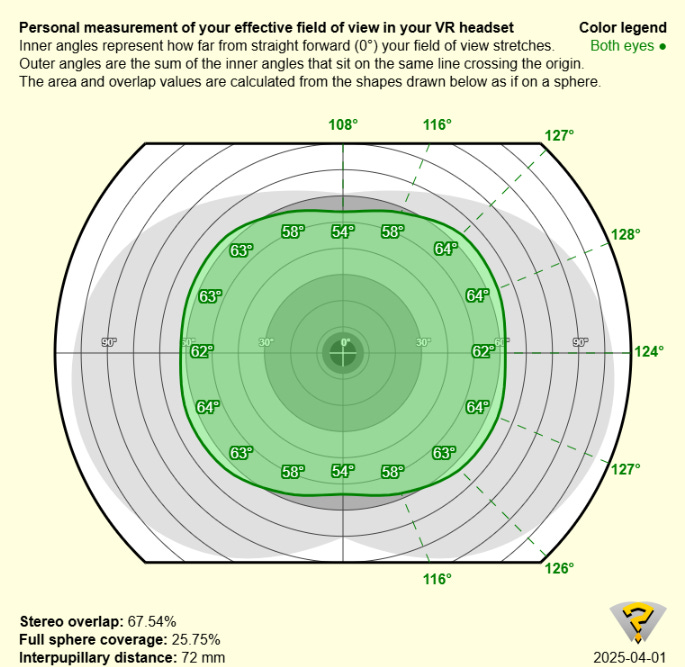
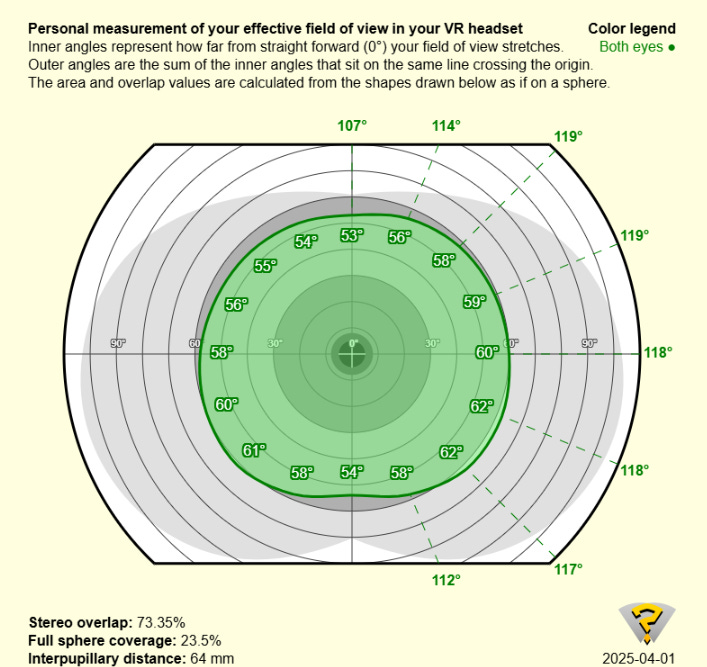
Here’s my WIMFOV results. First one is at minimum eye relief with maximized IPD (unusable as I need glasses and 72mm is far out of my sweet spot, but I just wanted numbers). Second one is my normal use-case (wearing glasses, at my IPD, and comfortably in the sweet spot).
Yes, I’m not joking. This level of FOV on a headset, around the same size as the Rift S and Reverb G2. Wild.
Thanks for reading!
Overall, does the PSVR2 replace my previous headsets and become my daily driver?
No. I don’t think I’ll be replacing my Beyond 2E for a decent while, at least not fully. It’ll be my main wired PCVR headset so long as I have base stations to track it.
That being said, I do see myself using the PSVR2 interchangeably among my arsenal. Now, it’s the Beyond 2E (for comfortable Social VR), Pico 4E (for wireless PCVR, face tracking, and standalone android dev), PSVR2 (for convenient half-body independent of base stations), and Apple Vision Pro (for spatial computing and AR).
If you like what I do, let me know in some way! I enjoy talking about things I explore, and hope you find something interesting or entertaining from what I write.
Sincerely,
~Salty
If you like what I do, I have a Ko-Fi page. Right now, there’s not much there, but I plan to post a few other things that might not fit on Substack there. Who knows, you might help fund the next evolutionary VR tech blogger!…..
Nahhhh, but it would be pretty cool if that happened.